
How to Sign Online — Ultimate Guide to sign.online
What to expect when using sign.online: how to sign documents online, a guide to the digital signing web app, and what electronic signatures actually look like.

Everything you need to know about signing documents online with sign.online — pricing, signature methods, step-by-step workflow, signature levels (SES, AES, QES), and how to verify a signed document.
Unlike complex subscription or enterprise-only software, sign.online was built for simplicity. Our main solution is a frictionless web application to sign documents electronically — available to any person or organisation, from SMEs in Europe to freelancers in Asia and multinational companies.
Whether you need one signature a month or ten thousand, you shouldn’t have to jump through hoops to get legally binding, high-security digital signatures. Every signature on our platform complies with European gold standards and is legally binding across borders.
1. Our pay-per-use model for modern professionals
When using the sign.online digital signing web application, the first thing you’ll notice is what we don’t have:
- Monthly subscriptions — you only pay for what you use.
- Accounts or passwords — we use transactional email workflows to keep things secure and fast.
- App downloads — everything happens in your browser.
This makes sign.online a great option for occasional users. The low-cost, transparent pricing also works well for teams that sign at volume. For these users, we offer a turnkey solution for batch signing of hundreds of documents in one automated workflow.
The cost. Most signature platforms force you into expensive monthly tiers. We’ve removed that barrier on our web app. No matter where you are, it’s a flat rate of:
- €0.99 per Advanced or Qualified electronic signature, for up to 4 users; or
- Free for Simple electronic signatures, for up to 2 users.
No hidden fees, no minimum purchase, no gotchas.
For business or government clients who need an integrated tool to automate document signing workflows, our turnkey solutions start with a setup fee from €5,000 and per-signature pricing of €0.50, payable monthly. No subscription or maintenance fees.
2. 40+ signature methods for borderless signing
Digital identities and signature methods are fragmented around the world — different countries use different systems.
sign.online bridges that gap. We support over 40 Qualified Electronic Signature (QES) and Advanced Electronic Signature (AES) methods globally, plus a free Simple Electronic Signature (SES) for simple transactions. From national identity systems to Smart-ID, BankID, and SMS OTP, our platform supports the trust providers that make signatures available and valid under the appropriate legal frameworks (such as eIDAS in the EU).
Our application also supports borderless signing — when you need signatures from multiple countries on a single document. You can initiate a contract in Singapore, have it signed by a partner in Germany using a hardware ID, and a co-signer in Estonia using Smart-ID, all within the same workflow.
3. Step-by-step: how to sign online
The sign.online digital signing web application is designed to be intuitive. Here’s the workflow:
- Upload document — drag and drop your PDF into the web app.
- Invite — enter the email addresses of the people who need to co-sign.
- Select method — choose SES for simple transactions and up to two signatories (signers draw their signature in the provided box), or QES/AES for transactions requiring more security.
- Pay — for QES or AES transactions, complete the €0.99 payment via our secure gateway.
- Sign — signers receive a link by email, verify their identity through their chosen method (e.g. national eID, SMS signature), and the document is signed instantly.
4. Choosing the right signature level
Not all digital signatures are created equal. Depending on the legal requirements of your document or the country of your co-signer, you may need a different level of verification.
The table below summarises the key features of each electronic signature level — SES, AES, and QES — and when to choose each.
| Feature | Simple (SES) | Advanced (AES) | Qualified (QES) |
|---|---|---|---|
| Security level | Basic | Enhanced | Highest |
| Identity verification | Limited (email / SMS) | Verified ID (e.g. photo of passport or driver's licence) | Certified identity (national eID, Smart-ID) |
| Legal status | Admissible in court | Strong evidentiary value | Equivalent to wet-ink signature |
| Burden of proof | On the initiator | On the initiator | On the party contesting the signature |
| Tamper evidence | Not guaranteed | Document sealed after signing | Highest level of cryptographic protection |
| Best for | Internal approvals, low-risk memos | Commercial contracts, NDAs, HR documents | Mortgages, high-value finance, government forms |
5. How to verify a signed document
Once the process is complete, all co-signers receive a signed PDF.
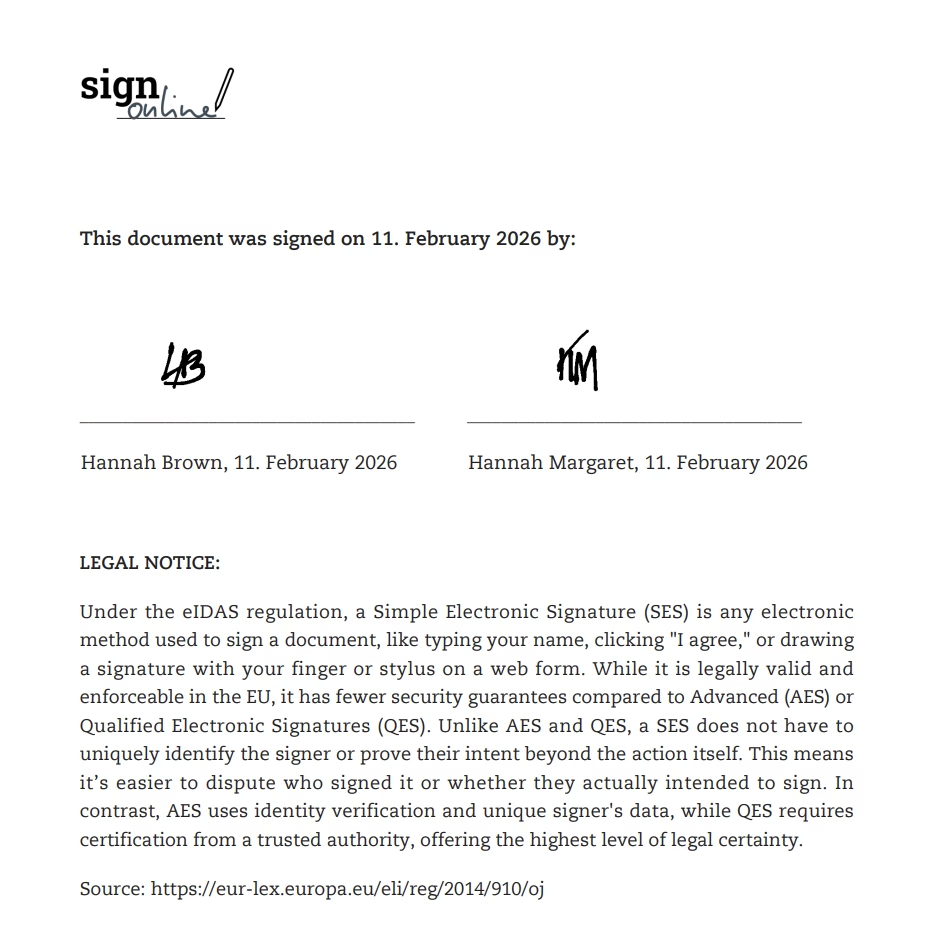
For SES (free), the resulting PDF contains an additional page with the names of the signatories, the dates they signed, and images of the signatures they drew in the web app.
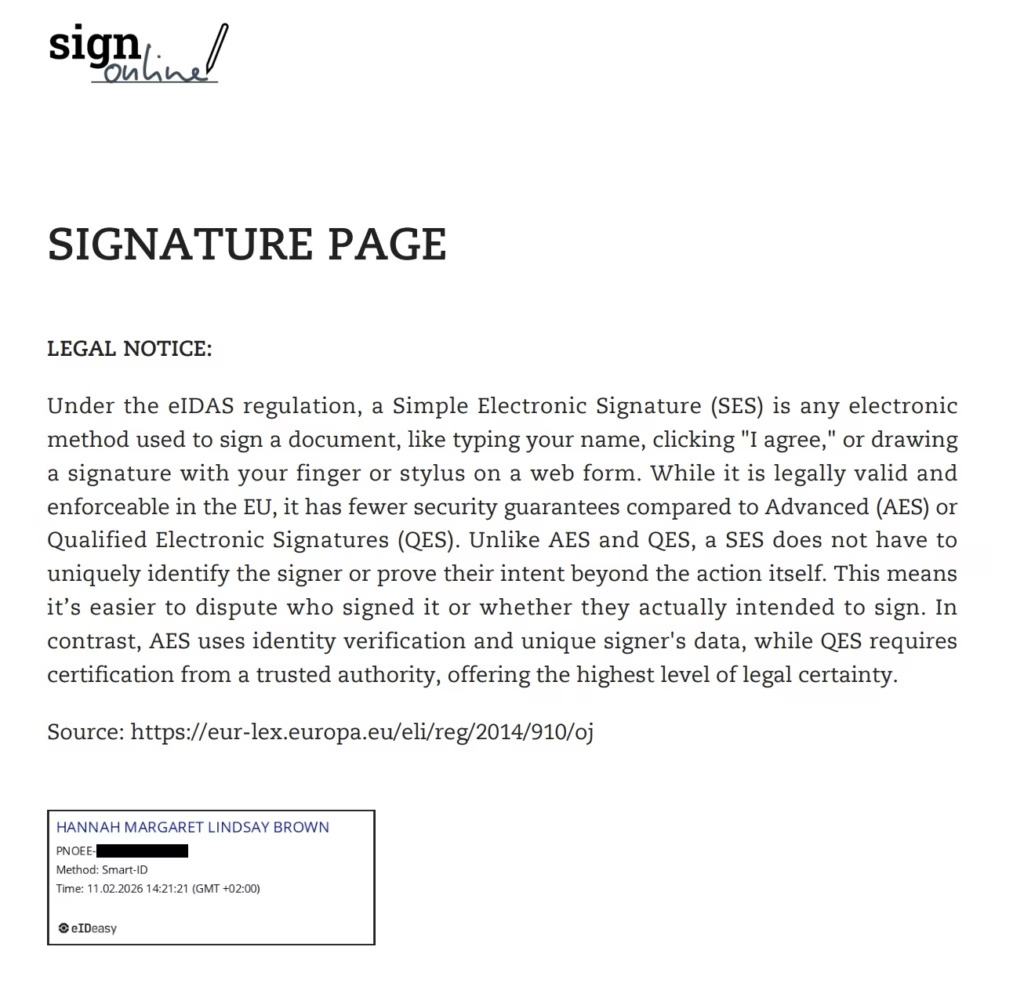
For QES, the PDF contains an additional page with the names of the signatories, their verified eID method, the date and time of the signature, plus unique code and metadata sealing the document.
Pro tip — use a PDF reader. To validate the signature, open the document in a standard PDF reader like Adobe Acrobat. The software automatically validates the digital certificate against the European Union Trust List and displays a timestamp plus a green checkmark or notification confirming the signer’s identity, that the signature is valid, and that the document has not been altered.
6. Compliance and data privacy
We handle your data with the highest level of security, in full compliance with the European GDPR. The electronic signatures available on our web app comply with the European eIDAS regulation.
When you use the service, you’re protected by our comprehensive Privacy Policy, which outlines how we secure and handle your information.
Frequently asked questions
Do I need to sign a contract to use sign.online?
No. There are no long-term contracts or commitments. The contractual relationship is established when you accept our Privacy Policy and Terms of Service during the document upload process. You simply pay per signature.
Can I get a VAT invoice?
Yes. Every transaction generates a VAT invoice, making it easy for businesses worldwide to claim expenses and stay compliant with local tax laws.
Is a digital signature legally binding?
Yes. Electronic signatures are generally recognised as legally binding across the EU and most jurisdictions, according to local digital signature laws.
What's the difference between SES, AES, and QES?
- SES (Simple Electronic Signature) — the most basic digital signature, usually represented by a confirmation of intent by email or by adding an image of your handwritten signature to a document. Fine for internal memos or initial business quotes; not usually recommended for contracts with legal obligations.
- AES (Advanced Electronic Signature) — high security, often using SMS codes or email verification. Great for most business agreements.
- QES (Qualified Electronic Signature) — the highest level of security, requiring face-to-face or digital ID verification (such as a national eID). Under the eIDAS regulation, a QES has the same legal standing as a wet-ink signature.
Which electronic signature should I choose?
As a rule of thumb for our global users:
- For standard business agreements, AES is usually perfect.
- For dealings with government bodies, real estate, or high-stakes financial transactions — or for maximum cryptographic protection — go with QES.
Do the co-signers need to pay?
No. The person initiating the document signing covers the cost. For QES and AES, up to 3 additional co-signers simply receive an email, click the link, and sign for free.
How long does the signature process take?
Usually less than two minutes. Since there are no apps to download or accounts to create, your co-signers can finish the process as soon as they open their email.
Is my data stored on your servers?
sign.online processes and protects your data in accordance with the European GDPR. We process only the data required to facilitate the signature and provide you with the signed document. We delete signed documents from our servers automatically after 7 days. Our Privacy Policy describes exactly how we secure, access, and delete data to keep your information safe.
Can I co-sign a document with someone in a different country?
Yes. One of the biggest advantages of our platform is the ability to co-sign documents globally. You can use your own national eID while your partner in another country uses their local QES method — all on the same document.
Do signers need to be in the same country?
No. You can invite co-signers from anywhere in the world. They simply choose the identification method available to them.
Ready to get started?
There's no better way to learn how to sign online than by doing. If you have a document that needs a signature, head over to our digital signing web app and see how easy it is.
Sign a document nowSign your first document today
No signup or subscription needed. Pay only when you sign.