
What to expect when using sign.online, how to sign online, guide to the sign.online digital signing web application, and what electronic signatures actually look like.
Unlike complex subscription or enterprise-only software, sign.online was built for simplicity. Our main solution is a frictionless web application to sign documents electronically – available for use by any person or organisation, including SMEs in Europe, freelancers in Asia, and multi-national companies.
Whether you need one signature a month or ten thousand, we believe you shouldn’t have to jump through hoops to get legally binding, high-security digital signatures. The electronic signatures you make on our platform comply with European gold standards and are legally binding across borders.
Here is everything you need to know about using our web application to securely sign, seal, and deliver your documents.
1. Our Pay-Per-Use Model for Modern Professionals
When using the sign.online digital signing web application, the first thing you’ll notice is what we don’t have:
- Monthly subscriptions: You only pay for what you use.
- Accounts or passwords: We use transactional email workflows to keep things secure and fast.
- App downloads: Everything happens right in your web browser.
This makes sign.online a really great option for occasional users. Plus, our low-cost and transparent pricing model makes our application fantastic for those who need to make many digital signatures. For these users, we also offer a turnkey solution for batch signing of hundreds of documents in one automated workflow.
The Cost: Most signature platforms force you into expensive monthly tiers. We’ve removed that barrier on our web application. No matter where you are, it’s a flat rate of:
- €0.99 per advanced or qualified electronic signature for up to 4 users, or
- Free for simple electronic signatures for up to 2 users.
No hidden fees, no minimum purchase, and no “gotchas.”
For business or government clients needing a more integrated tool to automate their document signing workflows, our turnkey solutions incur a setup fee starting from €5,000, plus the cost per signature is €0.50, payable monthly. No monthly subscription or maintenance fees.
2. 40+ Signature Methods for Borderless Signing
Digital identities and signature methods are fragmented around the world with different countries using different systems.
sign.online bridges that gap. We support over 40+ Qualified Electronic Signature (QES) and Advanced Electronic Signature (AES) methods globally, plus offer a free Simple Electronic Signature (SES) for simple transactions. From national identity systems to Smart-ID, and BankID to SMS OTP, our platform supports many trust providers in order to ensure signatures are available and valid under the appropriate legal frameworks (such as eIDAS in the EU).
Our application also supports borderless signing, i.e. when you need signatures from multiple countries on one document. For example, you can initiate a contract in Singapore, have it signed by a partner in Germany using a hardware ID, and a co-signer in Estonia using Smart-ID, all within a single workflow.
3. Step-by-Step: How to Sign Online
The sign.online digital signing web application is designed to be intuitive. Here is the workflow:
- Upload document: Drag and drop your PDF document into the web app.
- Invite: Enter the email addresses of the people who need to co-sign.
- Select Method:
- Choose an SES for simple transactions and up to two signatories, in which case signers will need to draw their signature in the provided box.
- Choose the QES/AES option for transactions requiring more security.
- Pay: For QES or AES transactions, complete the €0.99 transaction via our secure payment gateway.
- Sign: Signers receive a link via email, where they must verify their identity through their chosen method (e.g. national eID, SMS signature, etc), and the document is signed instantly.
4. Choosing the Right Signature Level
Not all digital signatures are created equal.
Depending on the legal requirements of your document or the country of your co-signer, you may need a different level of verification.
The following table summarises some key features of each electronic signature – SES, AES, and QES – and provides guidance on when to choose them.
Signature / Feature
Simple (SES)
Advanced (AES)
Qualified (QES)
Security Level
SES: Basic
AES: Enhanced
QES: Highest
Identity Verification
SES: Limited (Email/SMS only)
AES: Verified ID (e.g. photo of Passport/Driver’s License)
QES: Certified Identity (e.g. national eIDs, SmartID)
Legal Status
SES: Admissible in court
AES: Strong evidentiary value
QES: Equivalent to “Wet Ink” signature
Burden of Proof
SES: On the person who initiated the signature
AES: On the person who initiated the signature
QES: On the person contesting the signature
Tamper Evidence
SES: Not guaranteed
AES: Document is sealed after signing
QES: Highest level of cryptographic protection
Best For
SES: Internal approvals, low-risk memos
AES: Commercial contracts, NDAs, HR documents
QES: Mortgages, high-value financial deals, government forms
5. How to verify a signed document?
Once the process is complete, all co-signers will receive a signed PDF of your document.
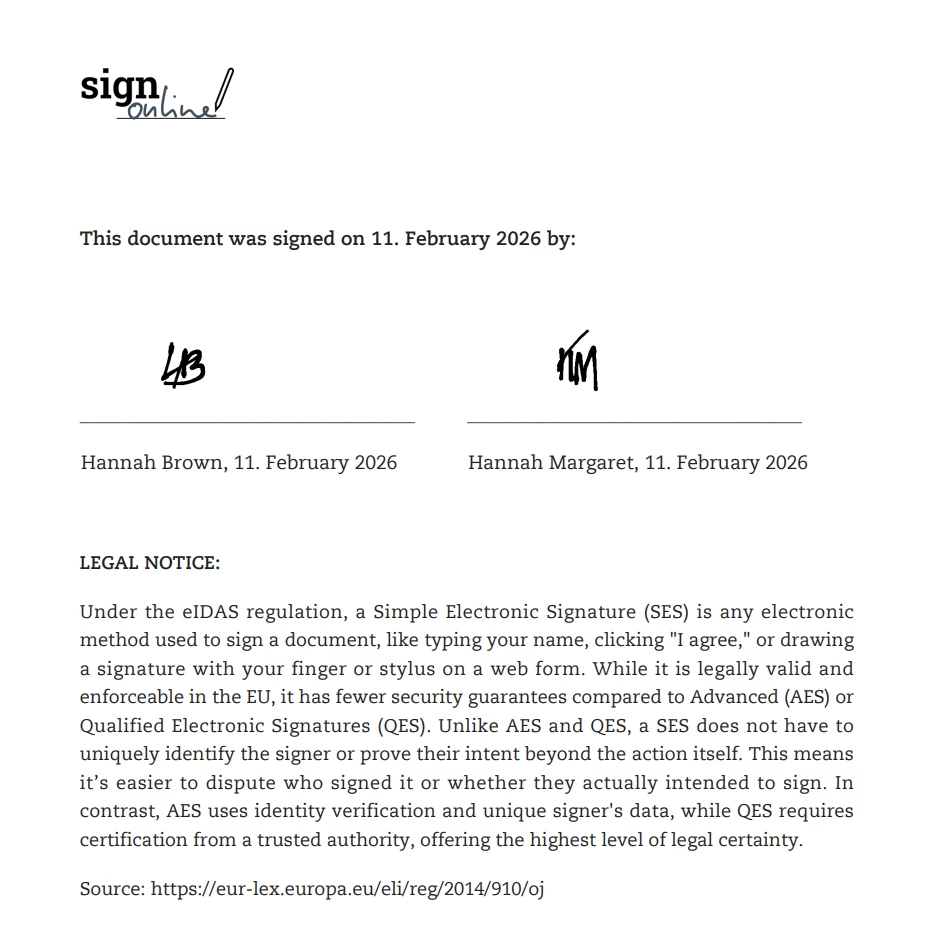
For documents signed using the free SES, the resulting PDF will contain an additional page with the names of the signatories, dates they signed, and images of the signatures they drew in the web app.
Here is a screenshot of an example signatory page for a document signed with SES (2 signers):
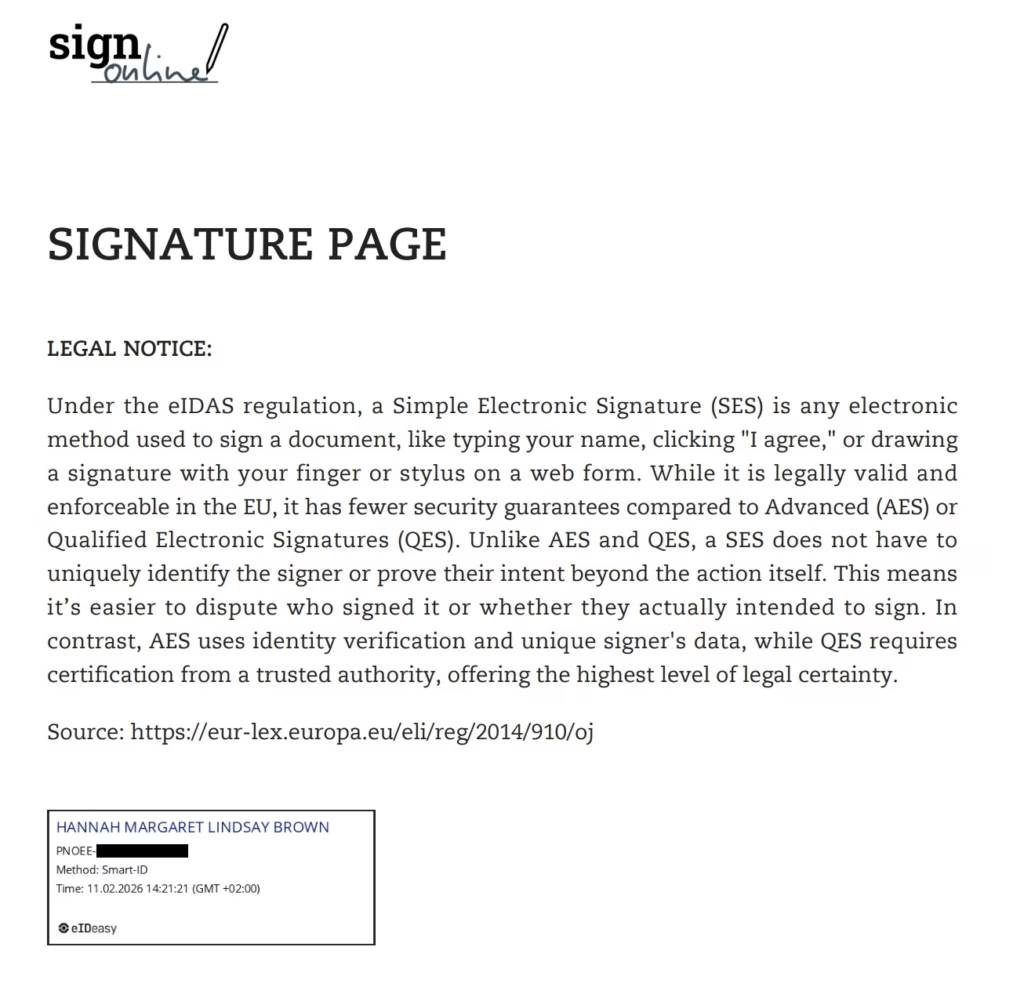
For documents signed using QES, the resulting PDF will contain an additional page with the names of the signatories, their verified eID method, and the date and time of the signature. The PDF will also contain unique code/metadata sealing the document.
Here is a screenshot of an example signatory page for a document signed with QES (one signer, whose ID code has been blacked out for security purposes). Note the method used was SmartID and the timestamps are recorded to the nearest second:
So, how do you prove it’s a valid, signed document?
Pro Tip: Use a PDF Reader.
To validate the signature, simply open the document in a standard PDF reader like Adobe Acrobat. The software automatically validates the digital certificate against the European Union Trust List and will display a timestamp and a green checkmark or a notification confirming the signer’s identity, the signature is valid, and the document has not been altered.
6. Compliance and Data Privacy
We handle your data with the highest level of security in full compliance with the European GDPR. Further, the electronic signatures available on our web application comply with the European eIDAS regulation.
When you use the service, you are protected by our comprehensive Privacy Policy, which outlines how we secure and handle your information.
Ready to Get Started?
There is no better way to learn how to sign online documents than by doing.
If you have a document that needs a signature, head over to our digital signing web application and see how easy signing online can be.
Frequently Asked Questions (FAQs)
Do I need to sign a contract to use sign.online?
No. There are no long-term contracts or commitments. The contractual relationship is established when you accept our Privacy Policy and Terms of Service during the document upload process. You simply pay per signature.
Can I get a VAT invoice?
Yes. Every transaction generates a VAT invoice, making it easy for businesses worldwide to claim expenses and stay compliant with local tax laws.
Is a digital signature legally binding?
Yes. Electronic signatures are generally recognized as legally binding across the EU and most jurisdictions according to local digital signature laws.
What is the difference between Simple (SES), Advanced (AES), and Qualified Electronic Signatures (QES)?
- SES (Simple Electronic Signature): The most basic digital signature, usually represented by a confirmation of intent by email or adding an image of your handwritten signature to a document. Fine for internal memos or initial business quotes; not usually recommended for contracts with legal obligations.
- AES (Advanced Electronic Signature): High security, often using SMS codes or email verification. Great for most business agreements.
- QES (Qualified Electronic Signature): The highest level of security, requiring face-to-face or digital ID verification (like a national eID. Under the eIDAS regulation, a QES has the same legal standing as a wet-ink signature.
Which electronic signature should I choose?
As a rule of thumb for our global users:
- If you are signing a standard business agreement, an AES is usually perfect.
- If you are dealing with government bodies, real estate, or high-stakes financial transactions – or if you simply want the absolute maximum cryptographic protection available – go with QES.
Do the co-signers need to pay?
No. The person initiating the document signing covers the cost. For QES and AES, up to 3 additional co-signers simply receive an email, click the link, and sign for free.
How long does the signature process take?
Usually, less than two minutes. Since there are no apps to download or accounts to create, your co-signers can finish the process as soon as they open their email.
Is my data stored on your servers?
sign.online processes and protects your data in accordance with the European GDPR. We process the data required to facilitate the signature and provide you with the signed document. We delete signed documents from our servers automatically after 7 days. Our Privacy Policy describes exactly how we secure, access, and delete data to keep your information safe.
Can I co-sign a document with someone in a different country?
Yes! One of the biggest advantages of our platform is the ability to co-sign documents globally. You can use your own national eID while your partner in another country uses their local QES method – all for the same document.
Do signers need to be in the same country?
No. You can invite co-signers from anywhere in the world. They simply choose the identification method available to them.
Written by: Hannah Brown (Chief Content Strategist) on behalf of sign.online